
If you run accounting in Poland, sooner or later you'll run into JPK VAT – and you'll quickly discover it's not a one-off obligation, but a monthly ritual (even under quarterly settlement, you still need monthly contact with the VAT reporting system) that can eat up hours of an accountant's time. The good news is that if your company uses Odoo, that ritual can be reduced to a few clicks. In this article we explain what JPK VAT actually is, what rules govern it, and how it's generated and submitted in the Odoo system.
What Is JPK VAT (the Standard Audit File)?
JPK VAT – Poland's Standard Audit File for VAT (Jednolity Plik Kontrolny) – is an electronic report submitted to the Ministry of Finance that combines two elements: the VAT records (a detailed list of sales and purchase transactions) and the VAT return (the settlement of output and input tax). The JPK_VAT obligation was rolled out in stages: large companies (2016), then small and medium enterprises (2017), and finally microenterprises from 1 January 2018 – from that point on it covers practically all active VAT payers in Poland. Since 1 October 2020 it has operated in a unified form known as JPK_V7 – in a monthly variant (JPK_V7M) or quarterly variant (JPK_V7K) – combining the records and the return in a single file.
In other words: JPK_VAT replaced the previously separate VAT-7 and VAT-7K returns. In a single XML document it combines return-level data with the detailed information coming from the VAT records, which the tax office can use for automated analysis and to detect irregularities.
Legal and technical status as of July 2026: since 1 February 2026, updated JPK_V7M(3) and JPK_V7K(3) structures apply, adapted to Poland's National e-Invoicing System (KSeF) and the deposit-return (kaucyjny) system – including a new field for the invoice's KSeF number. If you use accounting software (including Odoo with the Solvti module), make sure it generates files in the current, third version of the structure.
The JPK VAT obligation is part of a broader trend: Polish accounting has been steadily moving from manual, paper-based settlements toward fully automated, structured data exchange with the tax office. Each stage – JPK on request, JPK_VAT, JPK_V7 combining records with the return, and now the National e-Invoicing System (KSeF) – points in the same direction: less manual work, more data flowing directly from the accounting system.
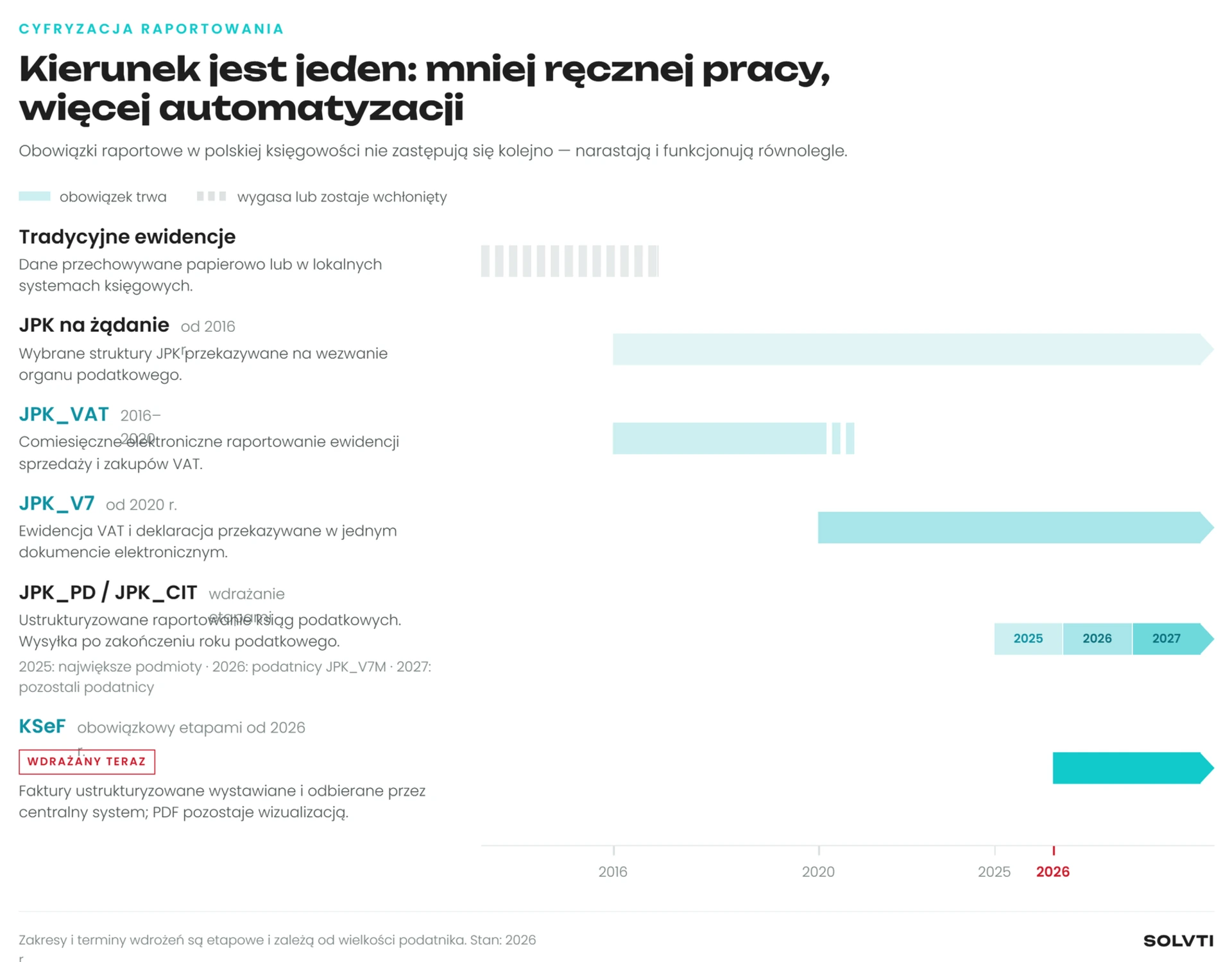
The evolution of the JPK VAT obligation in Poland – from large companies to microenterprises
Who Has to File JPK VAT, and How Often?
The obligation applies to all registered active VAT payers – both companies and sole proprietors. How often you file depends on the settlement mode you've chosen:
• JPK_V7M (monthly) – every calendar month generates a complete file, containing both the records and the return at the same time.
• JPK_V7K (quarterly) – records are still filed every month: in the first and second month of the quarter, only the records portion is filed (no return); in the third month, the records for that month are filed together with the return covering the whole quarter. This isn't a single combined file at the end of the quarter – it's three separate files, just like under JPK_V7M, only with the return spread out differently.
Choosing quarterly settlement is available mainly to small taxpayers who meet statutory conditions regarding sales value (including tax) - the current threshold corresponds to the equivalent of EUR 2 million. The law also sets out cases where quarterly settlement isn't available.
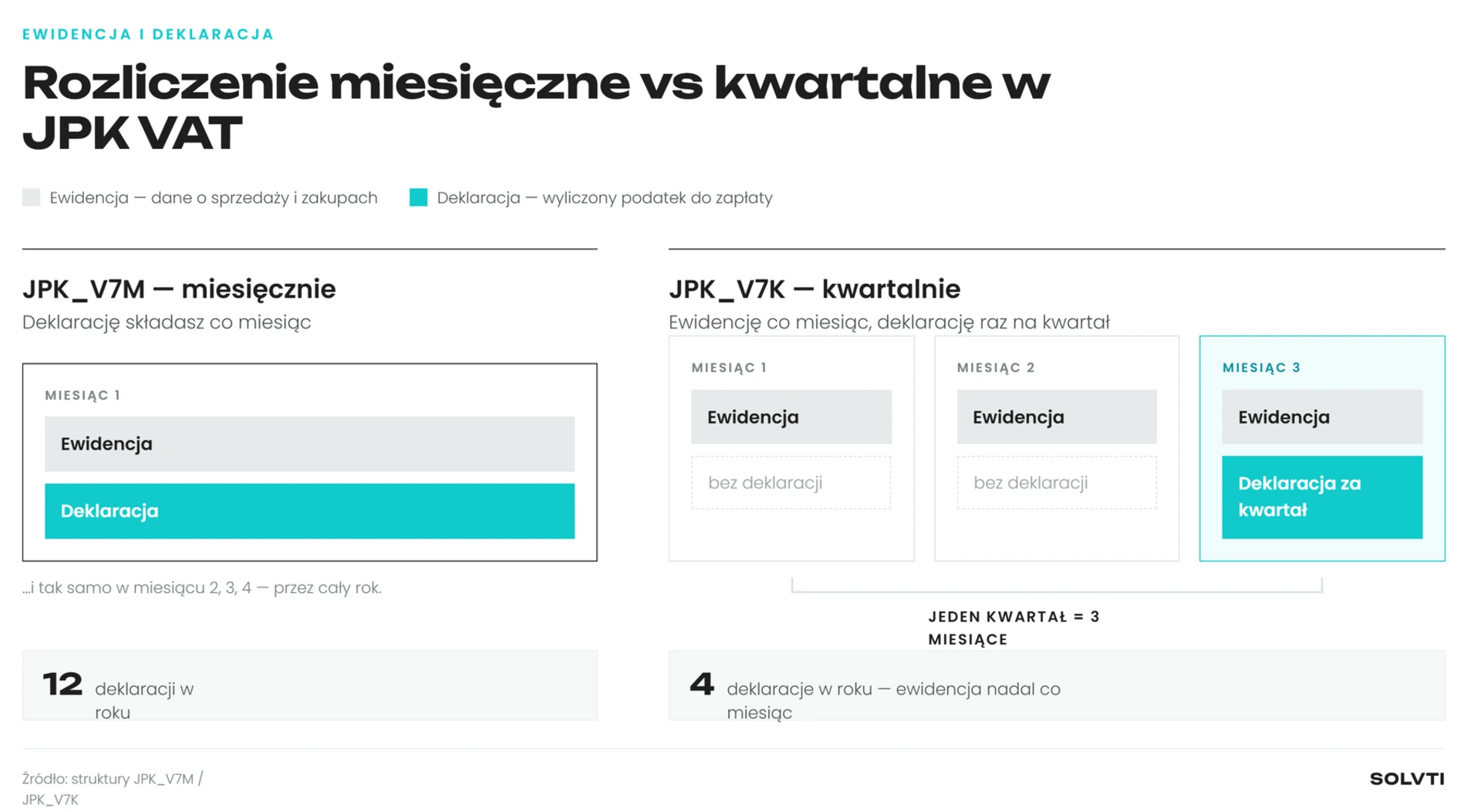
Monthly settlement (JPK_V7M) vs quarterly settlement (JPK_V7K) – records every month, return once per quarter under V7K
The Structure of the JPK_V7 File – What's Inside?
A JPK_V7 file consists of two logical parts, even though it's technically a single XML file:
• The records section – data from the VAT sales and purchase records, covering invoices as well as other required documents and accounting evidence, along with the relevant markers - such as GTU codes, procedure markers (e.g. TP), or document-type markers (e.g. RO, WEW, FP).
• The return section – aggregated amounts of output and input tax, entered in specific fields (e.g. P_10, P_11 for sales, all the way to the fields covering a VAT surplus to be refunded or carried forward).
This is precisely why JPK VAT is often seen as difficult – you need to get both the individual accounting entries right and the totals at the return level correct at the same time.
Deadlines and the Consequences of Errors
A JPK_V7 file is filed by the 25th day of the month following each settlement period – and this applies to every single month, including under quarterly settlement (as noted above, JPK_V7K also requires a monthly submission, just with the return spread out differently).
If the 25th falls on a Saturday, Sunday, or public holiday, the deadline moves to the next business day – a requirement stated directly by the Ministry of Finance on podatki.gov.pl.
If the tax office detects errors in the records that prevent verification of transactions, it calls on the taxpayer to correct them within 14 days.
Failing to fix the errors within that period may - though not automatically - result in a monetary penalty of PLN 500 for each error indicated in the notice, imposed by decision of the head of the tax office (legal basis: Article 109(3f)-(3h) of the VAT Act).
The most common source of errors isn't arithmetic mistakes - it's the gap between what the books “show” on the day the file is generated and what changes in the entries after it has already been sent.
Common Issues When Settling JPK VAT
• In the Odoo/Solvti module, a dedicated VAT Date field determines which settlement period an invoice is assigned to - changing it after the invoice has already been posted will shift it to a different month or quarter. Note that this is a module setting, not a standalone tax rule - the correct settlement period depends on factors such as when the tax obligation arises, the type of transaction, and the right to deduct, so this field's value still needs to be set according to the rules that apply to that specific transaction.
• Missing or incorrect GTU codes and special-procedure markers - for example, GTU_12 covers specific categories of intangible services (including advisory services, legal and tax advisory, and management-related services), not every service that could loosely be called “intangible.”
• Changes to accounting entries for a period that has already been filed with the tax office - which requires submitting a correction.
• Confusion over which invoice date determines the settlement period (the issue date, the posting date, or the so-called VAT Date).
This last point matters a great deal in the context of accounting systems - it's precisely how the software handles dates and return versioning that determines how much manual work the whole process requires.
How Does JPK VAT Work in Odoo?
In Odoo, once the relevant localization modules are installed (including the Solvti - JPK VAT / VAT-UE Send module), the entire JPK VAT settlement process is integrated directly with accounting - there's no need to export data to external tools or manually re-type amounts.
The system lets you preview JPK VAT data calculated “live” from current accounting entries at any time, even before you decide to generate the actual file for submission. Once the data is ready, you create what's called a draft - a snapshot of the data for a given period, which can still be manually adjusted (for example, the amount carried forward from the previous return, or how a VAT surplus is settled).
The next step is confirming the return (which generates an unsigned XML file) and signing it - in Odoo this is done by generating signing metadata, signing it with a qualified certificate in an external application (e.g. Szafir, proCertum), and uploading the signed file back into the system. Once signed, the return goes directly to the Ministry of Finance, and the system automatically checks (every hour) whether it has been accepted, saving the Official Confirmation of Receipt (UPO) on the record.
Importantly, if the related accounting entries change after the return has been submitted, Odoo automatically flags the return as requiring a correction and lets you generate a new, linked version - without you having to manually track down what changed.
Why Is It Worth Automating JPK VAT Settlement?
• Lower risk of error - the data comes directly from the accounting entries, with no manual re-typing.
• A complete history of submissions and corrections in one place, with automatic UPO retrieval.
• Automatic detection of the need for a correction whenever data changes for a period that has already been filed.
• Time savings for the accounting team - especially with a high volume of invoices and recurring monthly submissions.
If your company uses Odoo and you're looking for a way to bring order to your JPK VAT process (and the related VAT-UE return), it's worth seeing how this works in practice.
Summary
JPK VAT is a mandatory, recurring report combining VAT records and the VAT return, requiring precision and properly prepared accounting data. Odoo, together with a dedicated JPK VAT and VAT-UE module, lets you automate most of this process - from live data preview, through generating and signing the return, to handling corrections and archiving the UPO.
Want to see how Solvti's JPK VAT + VAT-UE module
works on your own data?